Overhead view of a tradesperson's desk with a laptop showing a chat window, a printed quote, pen, and coffee mug in soft daylight

What Seamless AI Integration Actually Means

Overhead view of a tradesperson's desk with a laptop showing a chat window, a printed quote, pen, and coffee mug in soft daylight

Seamless AI integration is the ability to connect your everyday work tools to a single AI interface so you can get things done from one conversation. Instead of jumping between ten different apps to finish one task, you talk to the AI and it reaches into those apps for you. That is the core idea, and it is simpler than it sounds.

A Real Example: Generating a Quote

Say you run a decking business in Perth. A customer calls and wants a quote for a three-tier merbau deck in Joondalup. Normally, you would open your pricing spreadsheet, check travel zones, pull up the client's details in your CRM, write the quote in a Word doc, and email it across. That is five apps and at least 20 minutes.

With seamless AI integration, you open one chat window and say: "Put together a decking quote for the Smiths, three-tier merbau, Joondalup address." The AI pulls your pricing, grabs the client details, generates the document, and sends it through. You never opened a second tab.

The reason this matters in 2026 is that the tools to make it happen are now genuinely accessible. You do not need a developer. You do not need to write code. You connect your apps and start asking.

Why Claude Is the Best AI Platform for This

Close-up of a laptop sidebar showing connected app icons with a hand on the trackpad under warm desk lamp light

There are several AI platforms out there, but if your goal is to connect tools and get actual work done from a conversation, Claude by Anthropic is the strongest option right now.

Built for Doing, Not Just Answering

The reason comes down to how Anthropic has positioned Claude in the market. While other AI tools focus on answering questions, Claude has leaned hard into getting things done. Its Connectors Directory is a library of over 50 one-click integrations that lets you hook up tools like Google Drive, Gmail, Notion, Slack, Xero, and Airtable without any technical setup. You click "Connect," sign in, and Claude can read from and write to that tool.

It can draft a Slack message, create an Asana task, search your Drive, pull data from your accounting software, and browse the web for research, all within one conversation. For a small business owner in Perth who just wants fewer tabs open and less busywork, that positioning matters.

AI Setup Essentials: The Building Blocks

Flat lay of everyday work objects arranged on a wooden kitchen table in natural morning light

Before you start connecting everything, it helps to know what a properly set up AI workspace actually needs. Think of these as the building blocks. Miss one and the whole thing feels clunky. Get them all in place and it genuinely starts to feel like having an extra pair of hands.

1. An External Knowledge Base

This is the most important piece. Your knowledge base is where your business information lives: processes, pricing, templates, client notes, brand guidelines. If Claude can access a tool like Notion or Google Drive that holds this information, it does not need you to explain the same things over and over. It already knows how your business works. Without a knowledge base, every conversation starts from scratch. With one, Claude becomes something closer to a team member who has read every document you have ever written.

2. A Web Agent

Claude can search the web, browse pages, and pull live information. That means research, fact-checking, competitor lookups, and current pricing can all happen inside the same conversation where you are drafting a document or replying to a client. This is what stops it from feeling like a closed system.

3. Connected Work Tools

This is where the "seamless" part comes in. Your email, calendar, project management app, CRM, accounting software, these all need to be connected so Claude can actually take action, not just talk about it. Sending an email, creating a task, logging a note, updating a spreadsheet. The more tools connected, the fewer tabs you need open.

4. File Creation and Handling

You will often need Claude to produce something: a quote document, a report, a spreadsheet, a slide deck. Make sure your setup supports file creation and that Claude can either save files to your Drive or hand them directly to you. This is the difference between "here is a draft" and "here is your finished document, ready to send."

5. Memory and Context

The best AI setups let Claude remember what it has learned about your business across conversations. Things like your preferred tone of voice, your regular clients, how you like your invoices formatted. Without this, you are re-explaining yourself every session. With it, the AI gets sharper every time you use it.

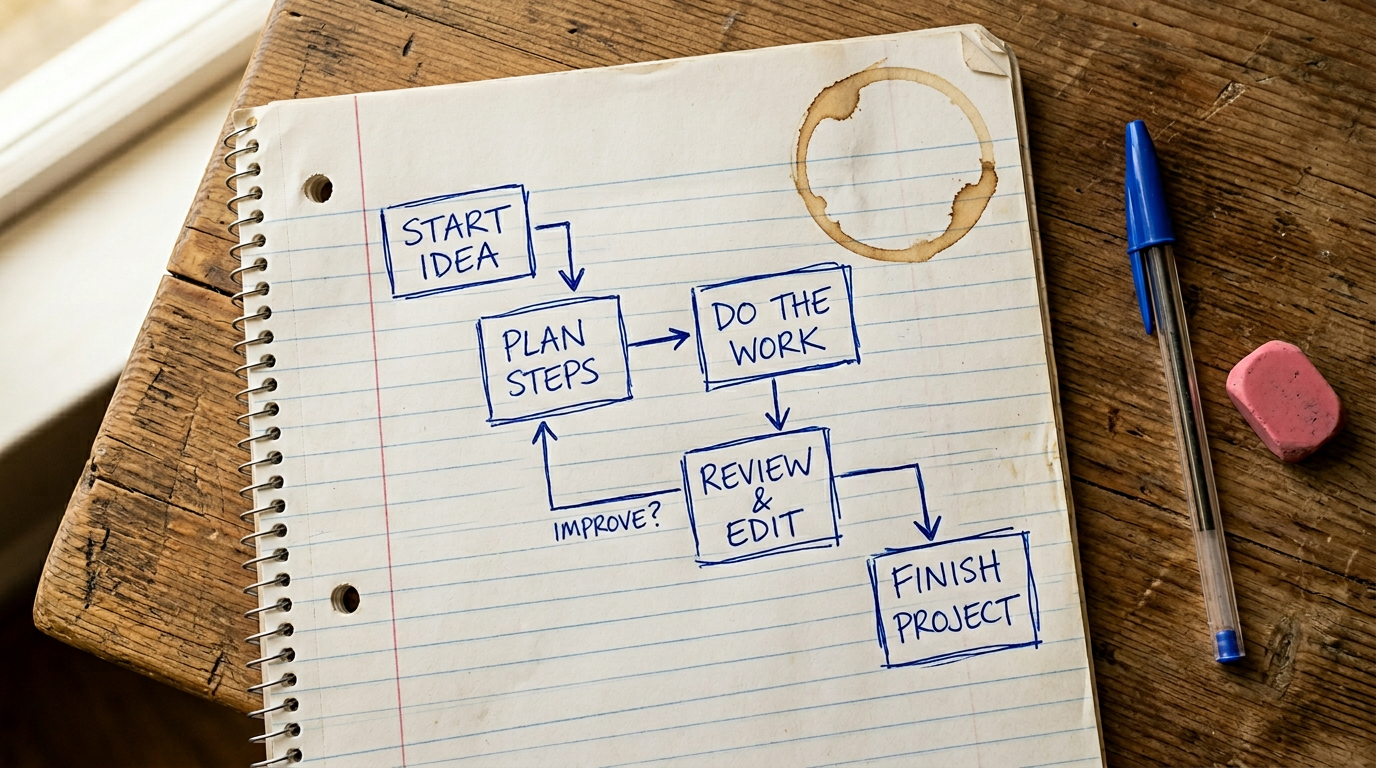
Map Your Workflow: A Practical Exercise

Hand-drawn flowchart on lined notebook paper on a timber desk with pens and a coffee ring

Here is a quick exercise that will show you exactly how much time connected AI could save you. It takes about five minutes and you only need a pen and paper.

Step 1: Pick a Repeating Task

Choose something you do regularly: writing a blog post, sending a client proposal, onboarding a new customer, or preparing a monthly report.

Step 2: List Every Step and Tool

Write down every step involved. For example, a blog post might look like this:

  1. Research the topic on the web
  2. Take notes in a Google Doc
  3. Write the draft
  4. Find or create images
  5. Upload the post to your website CMS
  6. Share it on social media

That is six steps across at least four different tools.

Step 3: Spot the Gaps

Now imagine Claude is connected to all of them: your Google Drive for notes, your CMS for publishing, your social accounts for sharing, and the web for research. You could walk through that entire process in one conversation. The tools Claude cannot reach yet are your integration to-do list. Start there.

Book a free 30 min call

Book a free initial chat to get an idea where AI can fit into your business right now.

Pick a time to chat

See What Tools You Can Connect Today

Person leaning back in a chair browsing a grid of app icons on a laptop with an overcast window behind them

The fastest way to see what is possible is to browse Claude's Connectors Directory. It is organised by category: productivity, communication, design, data, finance, and more. Each connector tells you exactly what Claude can do with that tool: read-only, read and write, or fully interactive.

How to Check

Look for the apps you already use. If your email, calendar, project management, or accounting software is listed, you are one click away from connecting it. The directory has over 50 integrations available as of early 2026 and Anthropic adds new ones regularly.

What If Your Tool Is Not Listed?

If your specific tool is not there yet, you can also connect any service that supports the Model Context Protocol (MCP), which is the open standard these integrations are built on. MCP is gaining adoption quickly, so there is a good chance your tool either supports it already or will soon.

The key takeaway: you do not need every tool connected on day one. Start with two or three that you use the most, build a few workflows that save you real time, and expand from there.

The Landscape Is Changing Fast

Dusk view through a smudged office window showing suburban shopfronts with a monitor and succulent in the foreground

Six months ago, most of what this article describes was not possible without a developer. Twelve months ago, the connectors directory did not exist. The pace of change here is genuinely unlike anything we have seen in business technology, and that is not hype. New integrations are being added every few weeks, and the AI models themselves are getting noticeably better at understanding context and following multi-step instructions.

What This Means for You

The workflow you mapped out in the exercise above will only get easier to build over time. Tools that are not connected today probably will be soon. Tasks that still need a workaround now will likely have a direct path in a few months.

The Advantage of Starting Now

The businesses that benefit the most from this shift will not be the ones that waited for everything to be perfect. They will be the ones that started with two or three connections, learned how to work alongside AI, and expanded as the landscape caught up. The tools will keep growing around you. The question is whether you are already using them when they do.